

Skip to content
assostro-header-logo
assistro
  • Integrations
    • Zapier
    • Shopify
    • HubSpot
    • Make
    • N8N
    • Chrome Extension
      • HubSpot
      • ClickUp
      • Monday.com
    • Flavor CRM
    • WordPress (Coming soon)
    • Metro Accounting (Coming soon)
  • Learn
    • Blog
    • Developer Guide
    • User Guide
    • Tutorial
  • Pricing
  • Contact Us
  • Get Started
Get Started

Extension

5
  • Define your own template to send schedule message
  • Send Message at a scheduled time using SyncMate
  • Bulk messaging at a scheduled time using SyncMate
  • Sending a Direct Message Without Saving a Number on WhatsApp
  • An onboarding guide for Extension

Other

23
  • How to Remove Branding from Messages
  • Connect your monday.com App with SyncMate
  • How to Get API Key / Access Token
  • QR Code Not Generating
  • How to Send an Image
  • Messages Failed Due to Daily Limit
  • How to Change WhatsApp Number
  • How to Check if WhatsApp is Connected
  • Messages Are Being Delivered Slowly
  • Waiting for this message. This may take a while
  • Message Not Received / Not Sent
  • Messages Stuck in Queue
  • How to use SyncMate in a 3rd Party application via OAuth – The Secure way
  • How to Add More Message Credits
  • How to Cancel Your Subscription
  • How to Subscribe to a Plan
  • Resolving Message Sending Failures
  • How to Keep Your WhatsApp Account Safe & Avoid Bans
  • How to back up your WhatsApp chats in HubSpot?
  • SyncMate User Guide: Regenerating Your Token
  • Getting Started with SyncMate and Shopify Integration: A Step-by-Step Guide
  • After Installation : Setting up SyncMate Chrome Extension
  • Assistro Dashboard

SyncMate

7
  • How to Connect Your Meta WhatsApp Cloud API with SyncMate?
  • Connect your WooCommerce App with SyncMate
  • Connect your Contact Form 7 App with SyncMate
  • Troubleshooting and Reconnection Guide
  • How to use SyncMate X Shopify Application ?
  • How to send automated WhatsApp messages on Google Calendar events?
  • How to Connect your WhatsApp with SyncMate?

Developer Guide

3
  • SyncMate User Guide: Regenerating Your Token
  • How to Set Up Webhooks for WhatsApp Events in SyncMate
  • Connect your Custom App with SyncMate

Tutorial

2
  • SyncMate Introduction Video
  • Use WhatsApp API with Custom applications using SyncMate

HubSpot

9
  • Connect your HubSpot App with SyncMate
  • How to Save a WhatsApp Contact to HubSpot Using SyncMate?
  • How to create a Deal for a WhatsApp Contact in HubSpot via SyncMate?
  • How to Create a Note for a WhatsApp Contact in HubSpot using SyncMate?
  • How to Create a Task for a WhatsApp Contact in HubSpot using SyncMate?
  • How to Create a Ticket for a WhatsApp Contact in HubSpot through SyncMate?
  • How to Create a Log for a WhatsApp Contact in HubSpot through SyncMate?
  • How to Back Up and associate Your Contacts’ Data in HubSpot?
  • An Onboarding Guide for HubSpot Via SyncMate

Zapier

7
  • How to fetch WhatsApp Group ID – Guide to Fetch Group ID
  • How to fetch WhatsApp Channel or Newsletter ID – Guide to Fetch Channel or Newsletter ID
  • How to connect Zapier with SyncMate?
  • How to send a WhatsApp notification to any individual?
  • How to send a WhatsApp Notification to any group or channel?
  • An onboarding guide for Zapier via SyncMate
  • How to connect Flavor CRM with SyncMate?

N8N

2
  • How to Send WhatsApp Messages via Assistro in n8n?
  • Connect your N8N with SyncMate

Shopify

1
  • Connect your Shopify with SyncMate

make

1
  • Connect your Make with SyncMate

Pabbly

1
  • Connect your Pabbly with SyncMate

Integrately

1
  • Connect your Integrately with SyncMate
View Categories
  • Home
  • user-guide
  • SyncMate
  • How to Connect Your Meta WhatsApp Cloud API with SyncMate?

How to Connect Your Meta WhatsApp Cloud API with SyncMate?

2 min read

This guide walks you through connecting your Meta WhatsApp Cloud API (official WhatsApp Business API) to SyncMate. Connecting Meta Cloud API enables high-volume messaging, verified green ticks, official message templates, and cloud reliability without phone battery dependencies.

Prerequisites & Co-existence Support #

Before starting the setup, ensure you have prepared the following:

  • Facebook Admin Account: Administrator access to your company’s Facebook Business Manager.
  • Business Phone Number: A phone number capable of receiving SMS or Voice Call OTP verification codes.
  • ✅ WhatsApp Co-existence Supported: You can connect your existing phone number to Meta Cloud API while continuing to use it on your mobile WhatsApp app as normal. No account deletion is required!

1
Open WhatsApp Manager in SyncMate #

Log in to your SyncMate / Assistro dashboard. In the left navigation menu under Connections, click WhatsApp Manager ( /whatsapp/configuration ). At the top of the connection status card, click Meta in the Active Channel Connection Mode bar.
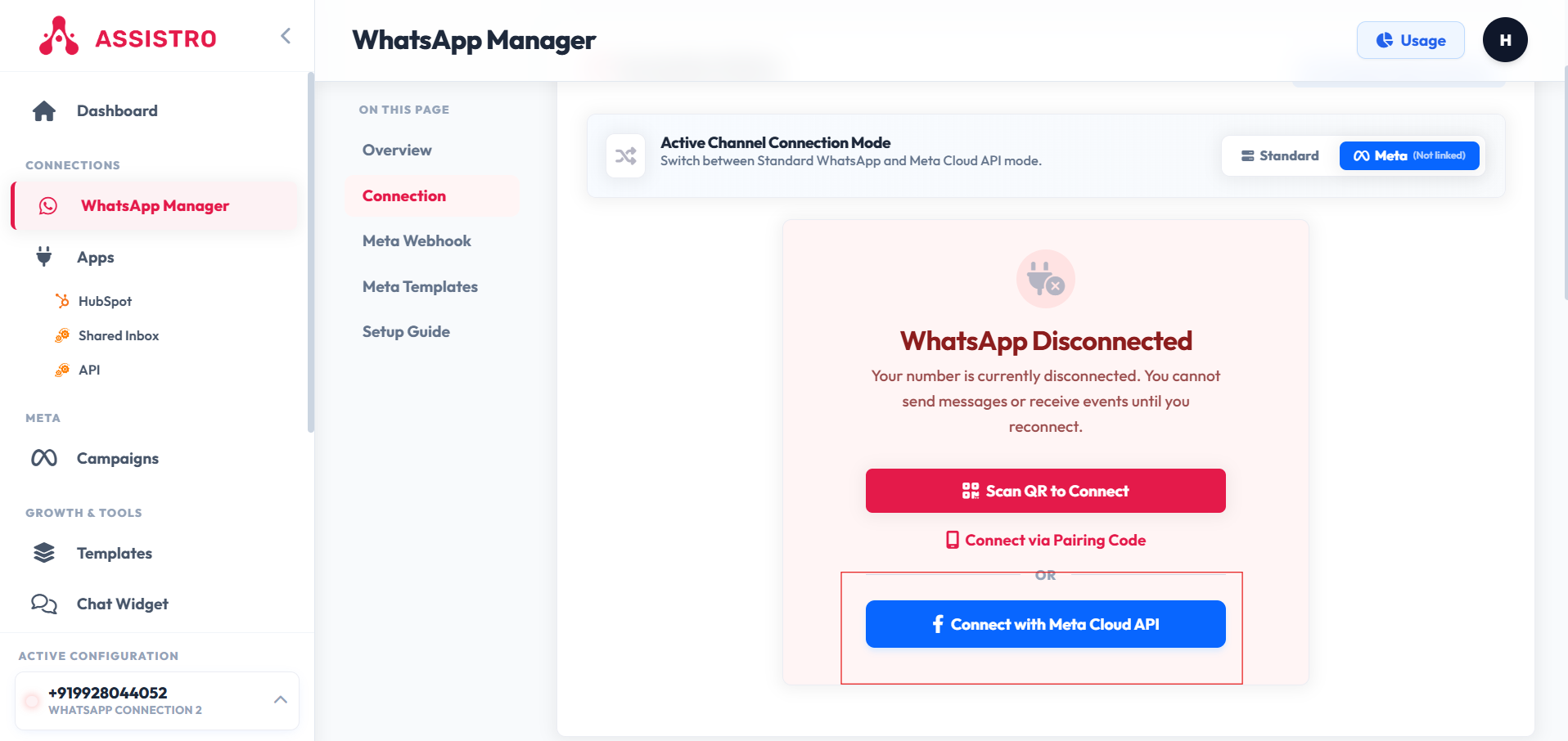
SyncMate WhatsApp Manager - Select Meta Connection Mode

2
Launch Meta Embedded Signup #

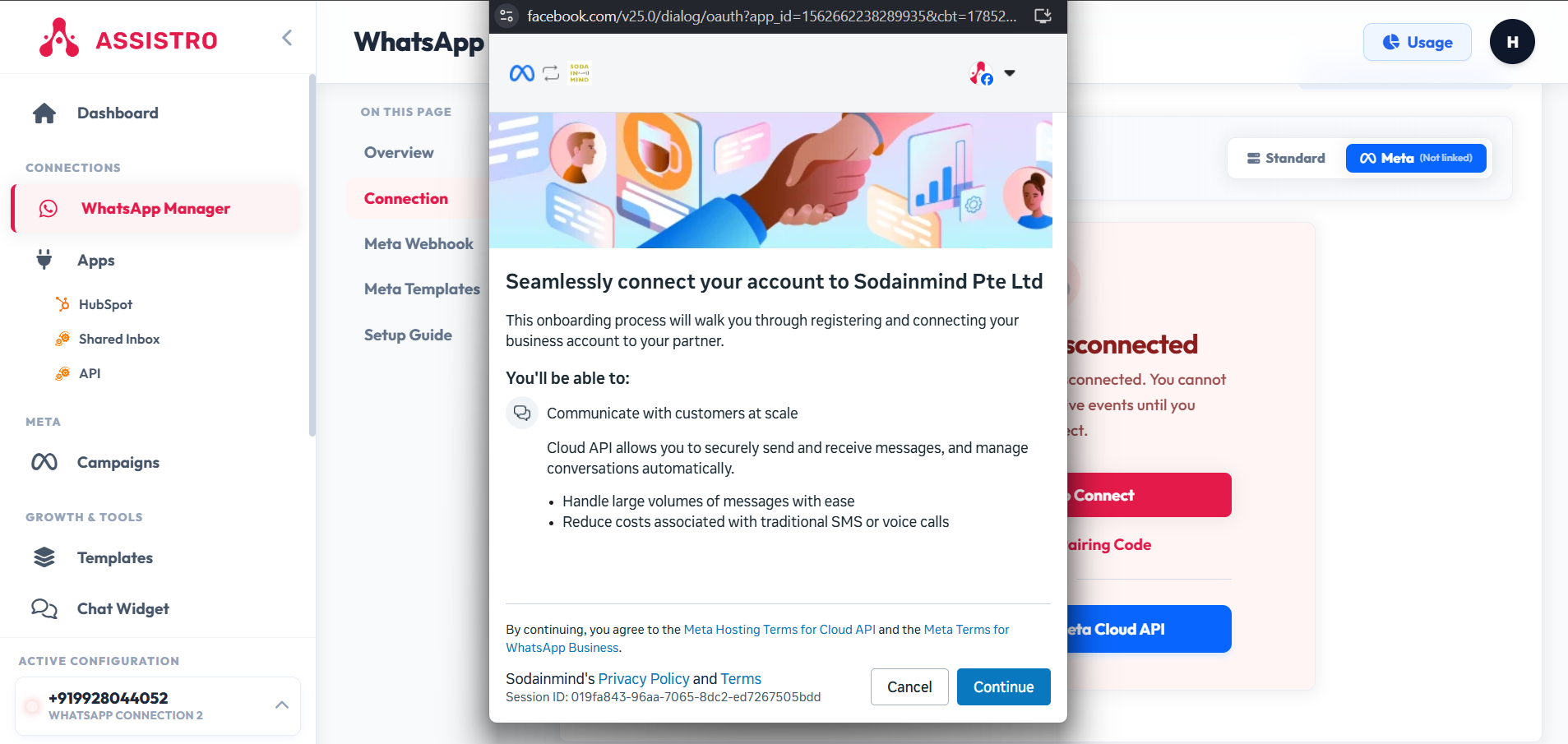
Click the blue button labeled “Connect with Meta Cloud API”. A secure Facebook popup window will appear. Log in using your Facebook account credentials.
3
Select Facebook Business Account & Profile #

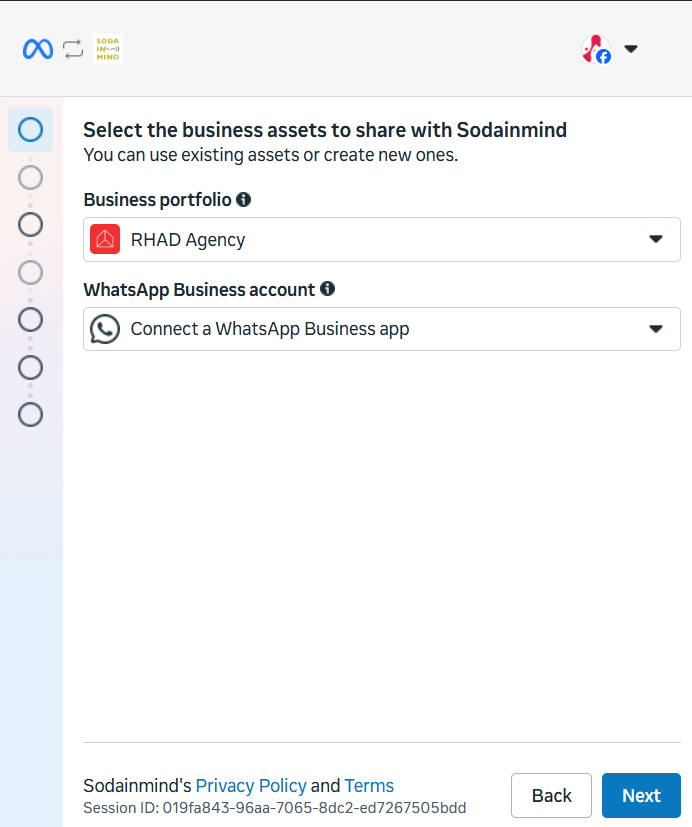
Select your Facebook Business Manager Account from the list. Next, fill in your WhatsApp Business Profile Name, Display Name, Time Zone, Currency, and Category (e.g. Retail, Financial Services, Education).
4
Register & Verify Business Phone Number #

Enter your business phone number with international country code. Select your preferred verification method: Text Message (SMS) or Voice Call. Type the 6-digit OTP code sent by Meta to complete verification.

5
Automatic WABA & Webhook Sync #

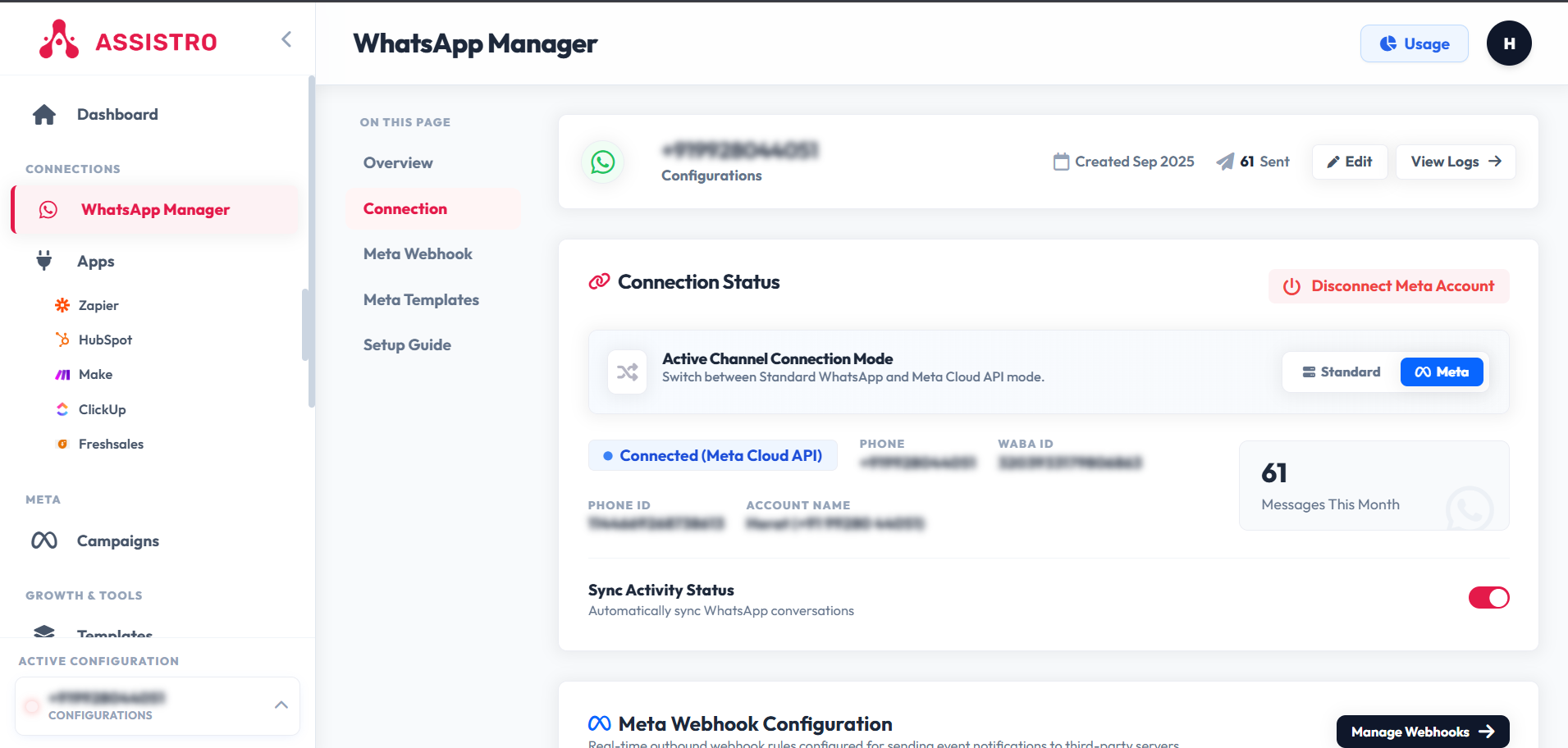
Click Finish. Your WABA ID (WhatsApp Business Account ID), Phone Number ID, and official Meta Cloud API Webhook configuration will automatically link to your SyncMate workspace!
🎉 Setup Complete! #

Your Meta WhatsApp Cloud API is now connected. You can now launch automated broadcasts, sync contacts to CRM, and manage team live chats.

🔗 Official Meta & Facebook Help Center Resources #

For additional details on managing your Facebook Business Portfolio and WhatsApp Accounts, refer to Meta’s official help guides:

  • 📘 How to Create & Set Up a Meta Business Portfolio
  • 📗 How to Check & Manage Your WhatsApp Account in Meta Business Suite
  • 📙 WhatsApp Business Account Display Name & Verification Guidelines
  • ⚖️ Meta WhatsApp Commerce & Business Messaging Policy
  • 🔒 How to Verify Your Business in Meta Business Manager
Updated on August 4, 2026

What are your Feelings

  • Happy
  • Normal
  • Sad
Share This Article :
  • Facebook
  • X
  • LinkedIn
  • Pinterest
Table of Contents
  • Prerequisites & Co-existence Support
  • 1 Open WhatsApp Manager in SyncMate
  • 2 Launch Meta Embedded Signup
  • 3 Select Facebook Business Account & Profile
  • 4 Register & Verify Business Phone Number
  • 5 Automatic WABA & Webhook Sync
    • 🎉 Setup Complete!
    • 🔗 Official Meta & Facebook Help Center Resources
assistro

We’re your innovation partner, delivering cutting-edge solutions that elevate your business to the next level.


    Navigation

    • Integrations
    • Pricing
    • Contact Us

    Integrations

    • Zapier
    • Shopify
    • HubSpot
    • Wordpress
    • Chrome Extension
    • Metro Accounting [Coming soon]
    • Flavor CRM [Coming soon]

    Learn

    • Blogs
    • Developers
    • User Guide
    • Tutorials

    © Copyright 2025, All Rights Reserved by Assistro